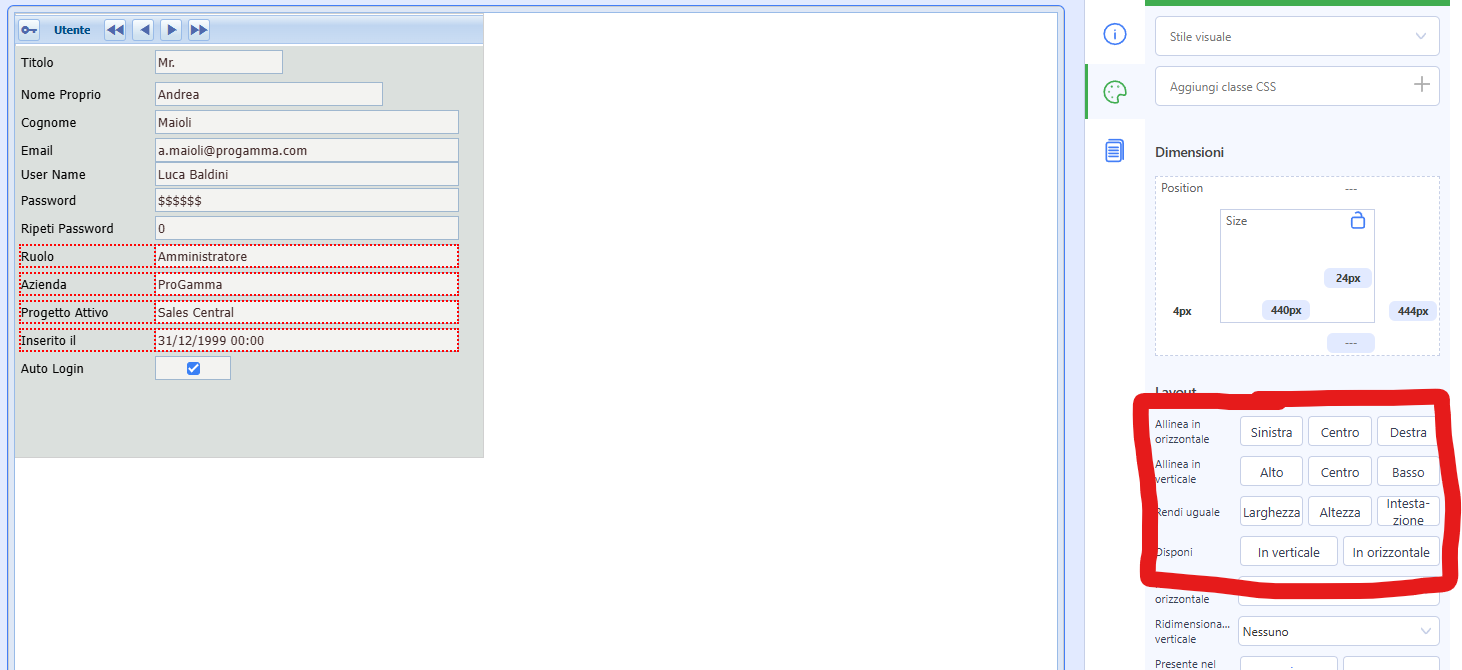
I cannot find a menu to align objects. For example left,right, top, bottom, middle. Can someone tell me if it exists and where it is?
Thanks
I cannot find a menu to align objects. For example left,right, top, bottom, middle. Can someone tell me if it exists and where it is?
Thanks
They are in the “style box”:
But they are visibile only if you select multiple fields with SHIFT+CLICK, not with the elastic selection (obviously a bug).
Will report and fix in the next release, thanks!
Thank you - I may have not found this without your help.
I’m adding this information to the Foundation differences manual.
I have updated the manual:
Can you create(translate) this an English version of the Instant Developer Studio guide. My efforts have not been very satisfactory.
John, I had Claude from Anthropic do a brutal translation, tell me if anything makes sense.
Thank you for the English version. It will be very helpful as I work with IDS. It is far better than what I was able to translate.
John we have to thank Claude